
Connecting BMS Alarm Notifications to Discord
In our office, we have a BMS (Building Management System) PC to monitor and manage all connected equipment throughout the building. The BMS Software can detect alarms on the devices and points. One problem though, we had to view the alarms directly on the PC.
To resolve this, my initial solution was to install Rustdesk (an open source remote management software), so we can remotely view the alarms and control the PC entirely. We were finally able to check the PC periodically to know that the systems are running fine.
However, periodic checks weren’t enough. One day, all the the rooms pressure in an area supplied by an AHU (Air Handling Unit) skyrocketed. We had no idea that it was happening until our lab user reported that the pressure was so high, making the doors impossible to open. I immediately accessed the BMS PC and discovered that the exhaust fan had turned off, caused by an electrical outage.
This incident made me realize that i needed a way to notify myself instantly whenever the alarms are triggered. Since the vendor told me that there was no external API provided by the BMS Software, I had to find another way.
Discovering YABE
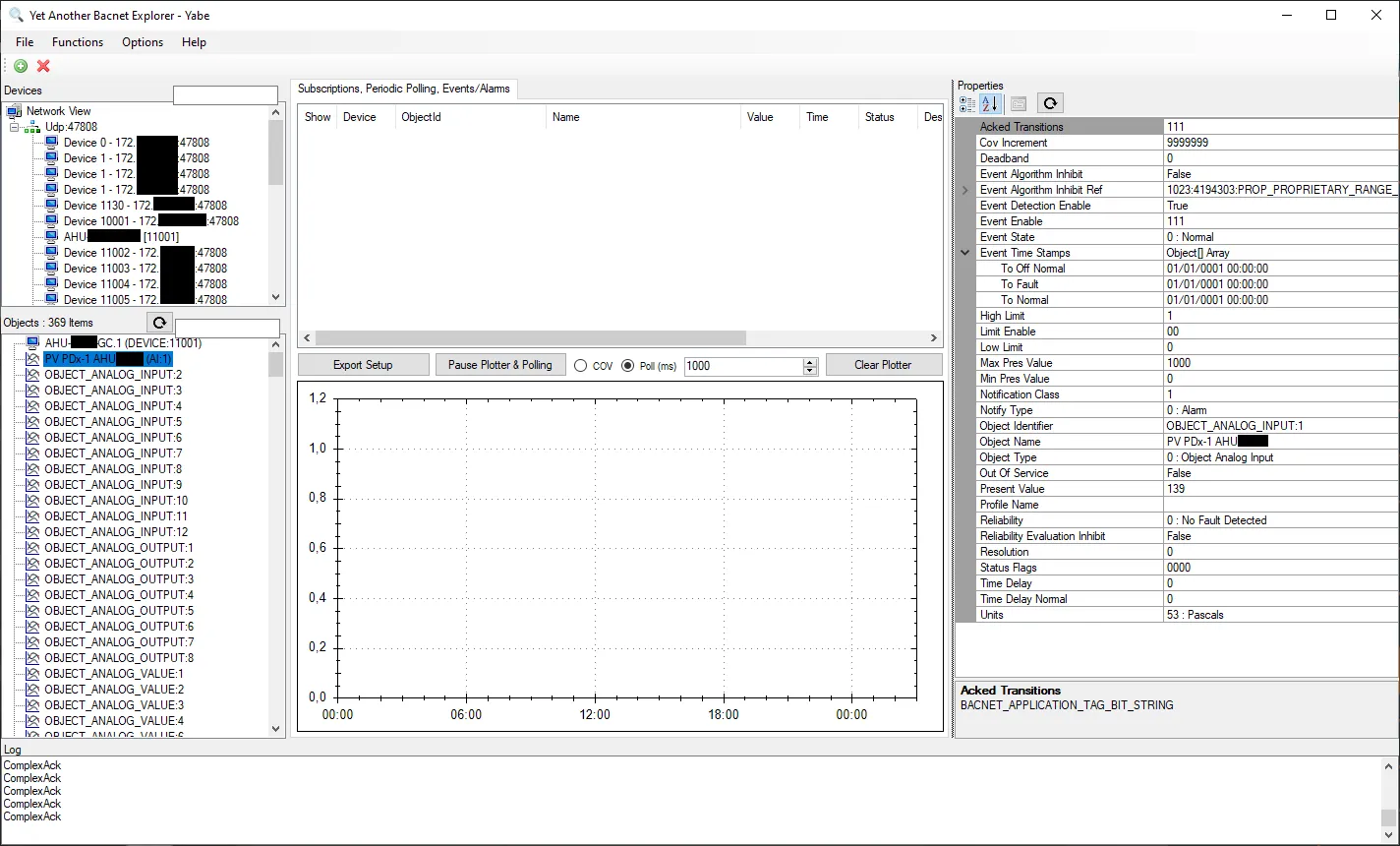
While searching for solutions on the internet, I found an app called YABE (Yet Another BACnet Explorer). After launching the app, I entered the SVC (Supervisory Controller) IP Address and it gave the list of the connected DDC (Direct Digital Controller) along with their registered points. I was relieved knowing that I had a chance. Inside YABE, I could find the point properties and their own values.
Fetching the points data using Node.js
Next, i needed to make an app to retrieve thes valuesprogrammatically. Since Javascript is one of my primary programming languages, i chose to develop the app in Node.js.
I found a BACnet library called node-bacnet. Although it hadn’t been updated in over 5 years, I gave it a try anyway. On the documentation page, it stated that the data could be retrieved using readPropertyMultiple().
To retrieve the point data, i needed to know these:
- Point type
- Instance number
- Property IDs
Using YABE, I can retrieve the point type and instance number. However for the property, i had to find the IDs from this page since YABE only provides the names of them. At that time, I needed only 3 of the properties:
| Property ID | Description |
|---|---|
| 77 | Object name |
| 85 | Present value |
| 36 | Alarm status |
Then, I mapped the points and their instances into JSON files per system (AHU and utility).
Sending the alarm notifications to Discord
The next step is to notify myself whenever an alarm is triggered. I chose Discord since I often use it. The setup was pretty simple. Just create a webhook on a Discord channel, then fetch a POST request to the webhook URL. Finally, I set up a cron to call the function on my app periodically. In short, the code snippet I used is the following:
const results = await new Promise((resolve, reject) => {
 client.readPropertyMultiple(
  DEVICE_IP,
  [{
   objectId: { type: POINT_TYPE, instance: INSTANCE_NUMBER },
   properties: [
    { id: 77 }, //Object name
    { id: 85 }, //Present value
    { id: 36 }, //Alarm status
   ],
  }],
  (err, value) => {
   if (err) {
    reject(err);
   }
   let objectPropertiesValues = value.flatMap((innerObj) =>
    innerObj.values.map((item) => ({
      id: item.id,
      value: item.value[0].value,
    }))
	  );;
   resolve(objectPropertiesValues);
  }
 );
});
for (const result of results) {
 //Skip if there is no alarm
 if (result.values[2].value == 0) continue;
 await fetch(DISCORD_WEBHOOK_URL, {
  method: "POST",
  headers: {
   "Content-Type": "application/json",
  },
  body: JSON.stringify({
   username: "BMS Alarm",
   embeds: [{
    title: "Alarm Alert!",
    color: 14500932,
    fields: {
     name: point.values[0].value, //Point name
     value: ALARM_DESCRIPTION
    }
   }]
  })
 });
}
Conclusion
By notifying BMS alarms to Discord, now, instead of waiting for users to report problems or manually checking the PC, I get Discord alerts whenever an alarm occurs. This significantly improves our incident response time, allowing us to restore the system faster when incidents occur.